Install the automation runtime
Each phone runs a small app that receives taps and reports what is on screen. tame installs it. Apple requires it to be signed, and that is the largest source of setup friction in this category.
There is no unsigned path on a phone that is not jailbroken. Not a tame decision, and there is no way around it.
The two paths#
| Free Apple ID | Paid Developer Program | |
|---|---|---|
| Cost | Nothing | About 99 USD a year |
| Certificate lasts | 7 days | A year |
| Phones you may register | 3 | Many |
| Signed apps per phone | 3 | Many |
| Xcode's account screen | Once | Never |
| Re-signing | Every phone, weekly | None |
Paid, which is headless#
Create a Team Key in App Store Connect
Users and Access, Integrations, Team Keys. Individual keys cannot use the provisioning endpoints and will fail.
Give it App Manager or Admin access
Anything less cannot register Devices.
Download the .p8
Apple lets you download it once.
Add it in tame Settings
Choose the file, paste the Issuer ID. tame reads the Key ID from Apple's filename and detects the Team ID. A brand new team with no certificate also needs the Team ID from Membership details.
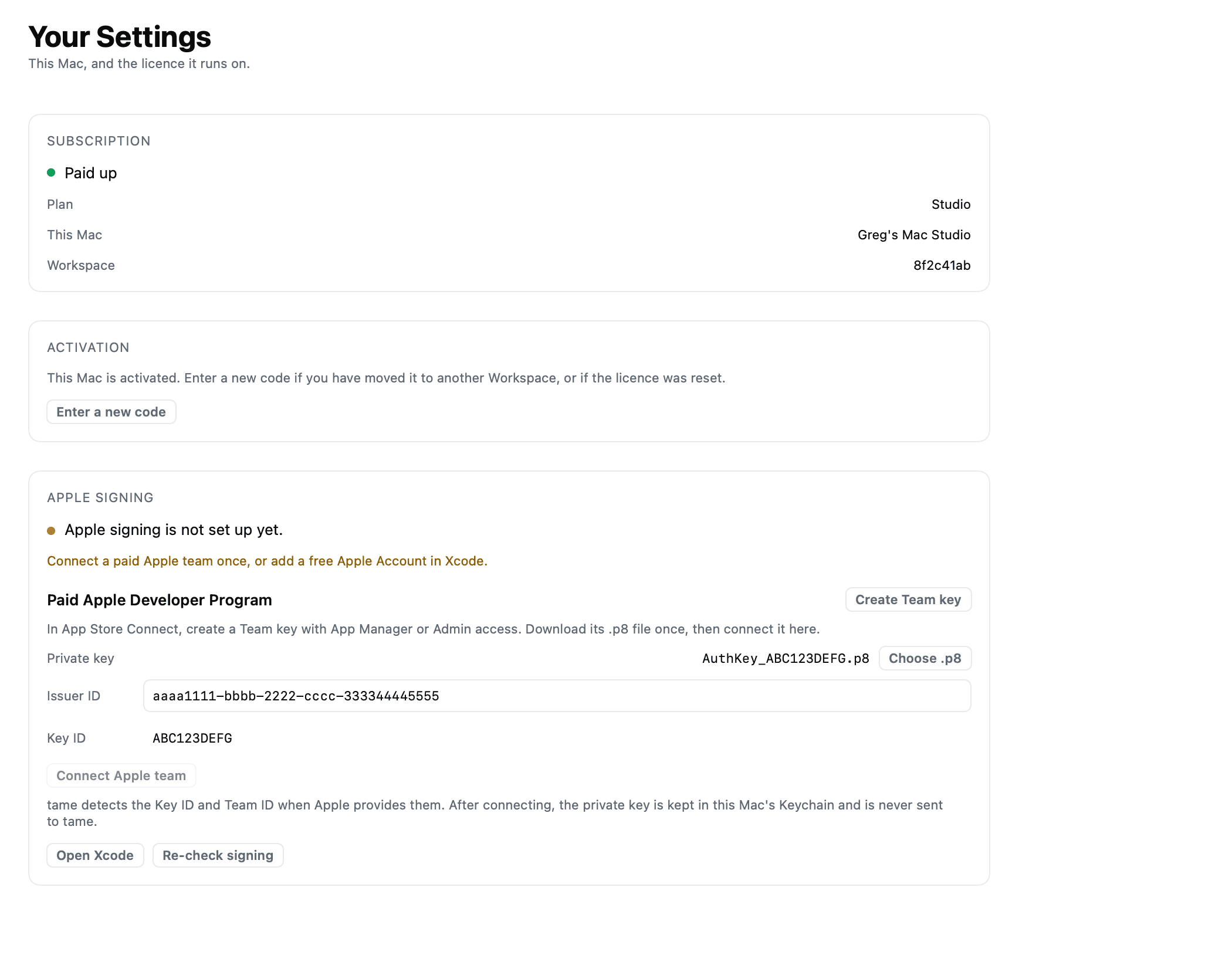
After this, plugging in a phone is the whole procedure.
Free, which is scripted#
Xcode, Settings, Apple Accounts. Add your Apple ID and create an Apple Development certificate. tame finds it and drives the build itself.
It cannot be made headless: Apple provides no way to authenticate a personal team outside Xcode's own interface.
Re-signing, weekly, on a free account#
It is a button, not a chore with a command line in it.
When a free certificate lapses, tame says so in words rather than failing obscurely, and warns two days ahead. To fix it:
- Re-check signing in Settings, Apple signing, which renews the identity.
- Make Device Ready on each phone, which rebuilds and reinstalls the runtime with the fresh certificate. After a failure the same button reads Retry Ready check.
One press per phone, so it is minutes on one Device and the reason to buy the membership on eight.
How tame knows which you have#
It reads the validity window on the certificate in your Keychain. Apple issues personal certificates for 7 days and paid ones for a year, and nothing else distinguishes them.
Anything ambiguous is treated as free, so nobody is promised a year they do not have. It is also what lets tame warn you before a certificate lapses, two days ahead for free and thirty for paid.
Getting a phone ready#
The Device panel offers one button at a time.
| Step | What it means |
|---|---|
| Connect Device | Plug in with a data cable, then unlock |
| Assign Account | Which Account this Device runs |
| Make Device Ready | Installs the runtime, checks the connection |
| Run warmup queue | Ready when you choose Run |
The first Make Device Ready needs you there, because the phone has to trust the Mac and have Developer Mode on. If it fails the button becomes Retry Ready check; unplug, plug back in, press again.
After it succeeds once, the phone prepares itself on plug-in.
Worth doing once, properly
Running more than a couple of phones? Start on the paid membership. The weekly re-signing is the thing people quit over.